04 · SleekFlow · 2024
Custom Objects
Designed Custom Objects — a flexible CRM foundation that lets businesses model and manage their own data structures inside SleekFlow.
Client
SleekFlow
Role
Product Designer
Year
2024
Focus
The Observation
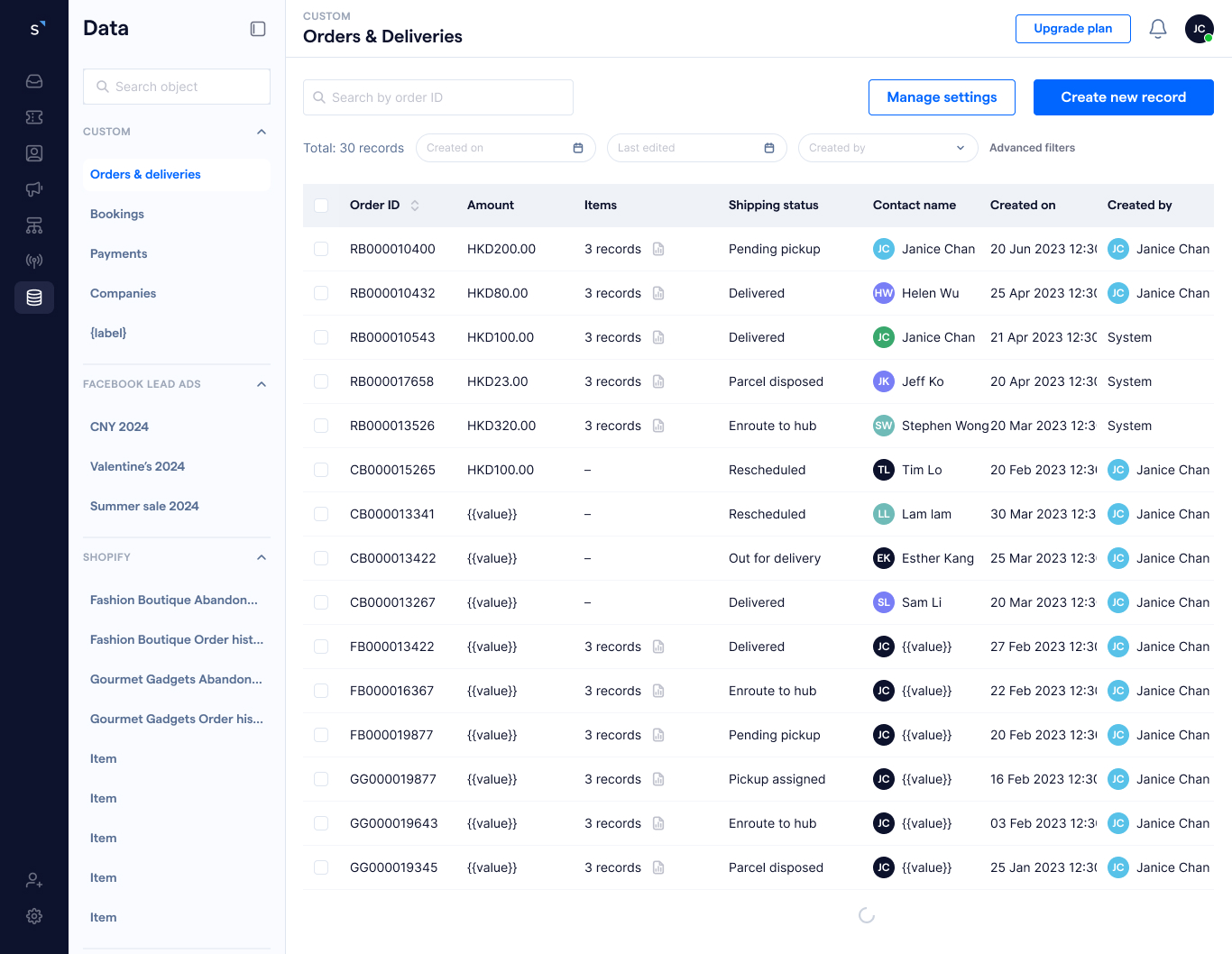
SleekFlow lets businesses store and manage customer data through contact properties. As companies grow, their data structures become more complex and extend beyond basic customer attributes — a real estate company managing property listings, a fitness studio tracking class bookings, a subscription business tracking memberships. Custom Objects introduced a flexible data model that lets organisations store specialised data directly within SleekFlow while staying consistent with workflows, automations, and integrations.
The Problem
Contact properties work well for simple attributes like email or phone, but break down when teams need structured or relational data. Fixed contact fields couldn't support different industries, struggled with one-to-many relationships (multiple orders or subscriptions linked to one customer), and forced teams into external tools — creating manual work and disconnected workflows.
The arc
- 01
Thinking
Contact properties weren't enough for how businesses actually work.
- 02
Doing
Product positioning, mental model, and progressive complexity shaped every decision.
- 03
Shipping
A two-phase rollout that became core CRM infrastructure.
Stage 01
Thinking
Contact properties weren't enough for how businesses actually work.
SleekFlow lets businesses store and manage customer data through contact properties. They work well for simple attributes — email, phone, location — but become limiting the moment a team needs to manage structured or relational data.
- →Limited flexibility — different industries need different data models; fixed contact fields couldn't keep up.
- →Limited data relationships — the existing model struggled with one-to-many relationships like multiple properties, orders, or subscriptions linked to one customer.
- →Disconnected workflows — teams relied on external tools to manage business data, creating manual work and reducing efficiency.
A real estate company may need to manage property listings. A fitness studio may track class bookings. A subscription business may track customer plans or memberships. The product needed a foundation that could flex to each of them.
The goal
Improve data flexibility, support complex workflows, reduce operational friction, and enable future platform capabilities — so users could organise specialised business data, build more powerful automations, and integrate more effectively with external systems.
Stage 02
Doing
Product positioning, mental model, and progressive complexity shaped every decision.
1. Product positioning
How do we introduce a highly technical capability in a way business users can understand?
2. Mental model
How do we help users understand the relationship between contacts, properties, and objects? I framed SleekFlow contacts as a type of object, referencing HubSpot's object model to align the team on a shared mental model.
3. Progressive complexity
How do we make the system powerful without overwhelming users? Phased the release — properties first, relational structures second — so adoption could grow with confidence.
Stage 03
Shipping
A two-phase rollout that became core CRM infrastructure.
Phase 1 — Custom Object Creation
Custom object creation, field types, validation, and management — including record management and custom object setup — giving teams a flexible way to extend their contact data without engineering.
Phase 2 — Arrays of Objects & Integration Support
Introduced arrays of objects and integration support — turning the feature into a relational data model teams could build their workflows around.
Outcome
Outcome
Phase 1 — Post-launch (3 months)
3.8%
Adoption Rate
42
Active Accounts
9.4%
Integration-linked Usage
Overall adoption stayed low despite enablement, but customers who did adopt gave strongly positive feedback — especially around record searchability and data organisation.
Phase 2 — Post-launch (3 months)
9.7%
Adoption Rate
103
Active Accounts
27.6%
Integration-linked Usage
Adoption improved significantly as customers began using Custom Objects for more advanced workflows.
1 year post-launch
54.8%
Adoption Rate
2,274
Active Accounts
61.3%
Integration-linked Usage
The feature became core infrastructure for advanced customers — enabling complex workflows, supporting enterprise use cases, reducing reliance on external tools, and unlocking future product opportunities.